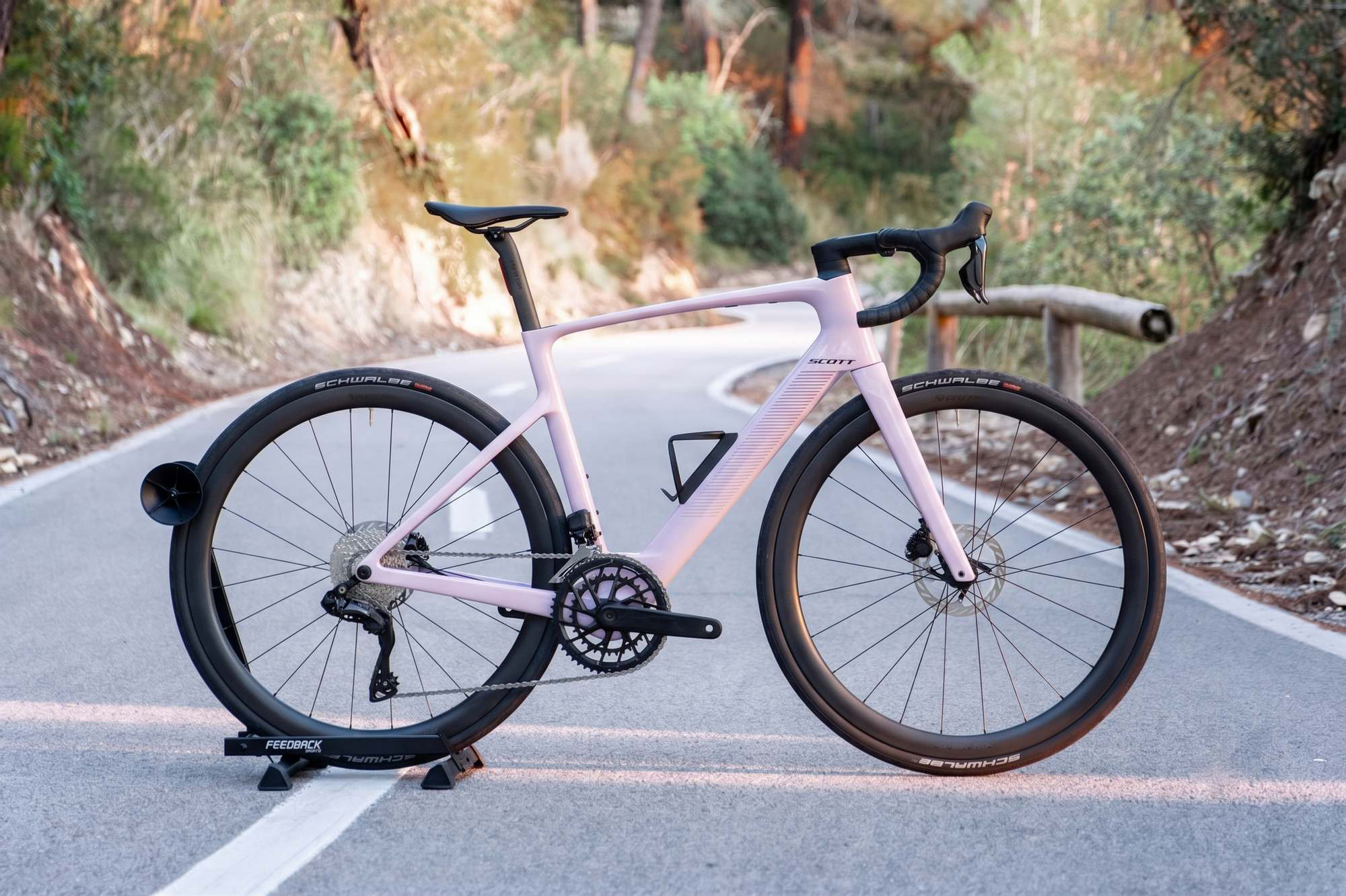
Mallorca’s climbs, coastal roads, and long days in the saddle—with a little extra help when you need it.
Your Scott Fastlane combines the feel of a road bike with discreet electric assistance. You still pedal, change gears, and choose your pace. The motor adds support when the road turns uphill or your legs could use a break.
This guide explains how to use the controls, charge both batteries, care for the bike, and handle common questions during your rental.
⚡ Quick Answers — Find What You Need
🎒 What’s included with my bike?
⚙️ How do I use the electronic gears and motor assistance?
🔋 How do I check and charge both batteries?
🧴 Does my chain need oil or wax?
🛞 What should I do if I get a puncture?
⛰️ How do I get the most from my ride?
🆘 Something isn’t working. What now?
1. What’s Included with Your Bike?
Your Scott Fastlane comes with the essentials for your ride:
- An additional range-extender battery, mounted in the position normally used by the second bottle cage.
- A compatible TQ charger for charging the bike’s batteries.
- A saddle bag containing a spare inner tube, tyre levers, and a multitool.
- A mini pump mounted on the frame.
- Transparent protective film to help protect the frame from everyday scratches.
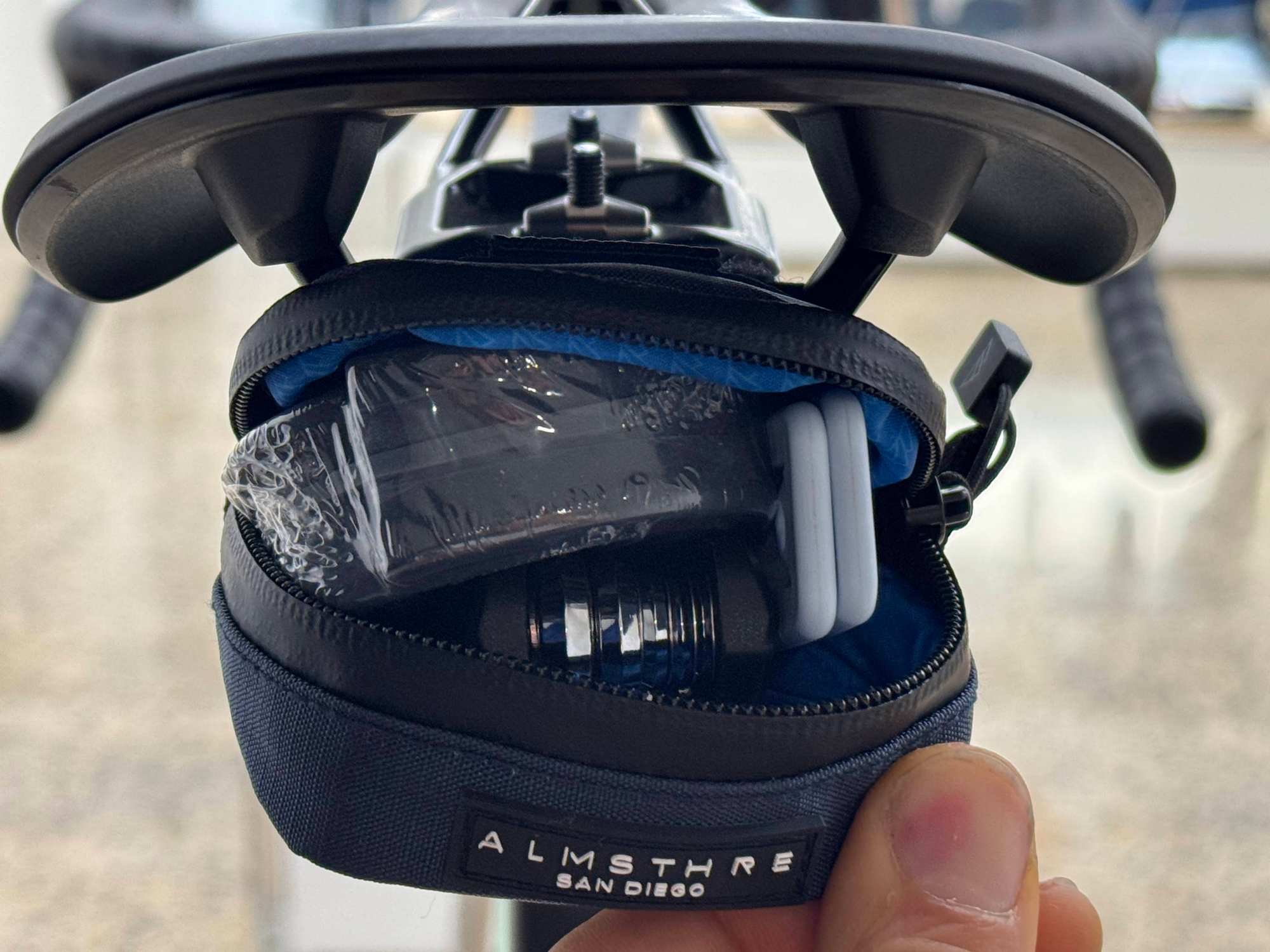
Before setting off, locate the pump, check the repair kit, and make sure you understand the battery connections shown during handover.
The range extender takes up one bottle position, so plan your water supply and refill stops before a longer ride.
2. How to Use Electronic Shifting and Motor Assistance
Your Fastlane has two systems working together:
- Shimano 105 Di2 electronic shifting changes your gears.
- TQ HPR40 motor assistance adds support to your pedalling.
An easier gear helps you turn the pedals comfortably. More assistance adds motor support. Use both as the terrain changes.
Switching the bike on and off
The power button is on the small LED indicator display at the end of the handlebar.
- Briefly press the button to switch the system on.
- Check that the indicator lights respond.
- Select a low assistance level.
- Test the gears while gently pedalling somewhere quiet.
To switch the system off, press and hold the same button until the display turns off.
Choosing your assistance level
Use the assistance buttons shown during handover. Their positions and functions will be demonstrated on your bike.
The bar-end display uses colours to show the selected level:
- White - System on, no motor assistance
- Green - Low assistance
- Blue - Medium assistance
- Red - High assistance
Low assistance gives a gentle boost. Medium and high assistance provide more support when the route becomes demanding, but use more battery.
A steady red light means high assistance. Flashing red lights indicate a system fault.
Changing gears
Use the Shimano shift buttons to choose an easier or harder gear.
With the standard Shimano arrangement, the right-hand shift buttons control the rear gears, while the left-hand buttons change between the two front chainrings. Button assignments can be customised, so follow the setup demonstrated during handover.
- Use easier gears for climbs and starting.
- Use harder gears as your speed increases.
- Keep pedalling while shifting, but briefly ease the pressure on the pedals.
- Shift before a climb becomes steep rather than waiting until you are pushing hard.
Riding without assistance
Select the white, no-assistance mode and leave the system switched on.
On this Fastlane setup, the electronic gears receive power from the bike’s electrical system. Switching the whole system off also stops electronic shifting.
This matters on flat roads and descents: you can save motor energy without turning off the gears.
3. How to Check and Charge Your Batteries
Your bike has two batteries:
- The internal battery, fitted inside the frame.
- The range extender, mounted outside the frame in a bottle-cage position.
The internal battery stays in the bike for charging. Do not attempt to remove it.
How the two batteries work
During riding, the system uses the range extender first, then the internal battery.
An empty range extender does not necessarily mean that all your battery power is gone. Keep track of the internal battery too.
The number of illuminated segments on the bar-end display indicates the charge level of the battery currently being used. The light colour indicates the assistance mode.
For more detailed battery information, ask us.
Charging both batteries together
You can charge both batteries through the range extender while it remains connected to the bike.
- Park the bike securely and switch the system off.
- Leave the range extender connected to the bike’s charging port.
- Check that the charger connector and charging socket are clean and dry.
- Connect the supplied charger to a suitable mains socket.
- Open the range extender’s charging-port cover and connect the charger.
- Allow enough time for both batteries to charge.
- Disconnect the charger and close the charging-port cover before riding.
The internal battery charges first. The range extender charges afterwards.
If you disconnect early, the internal battery may be full while the range extender still needs charging.
Charging the internal battery on its own
If the range extender is disconnected, connect the supplied charger directly to the bike’s charging port.
Follow the connection method shown during handover. Never force a plug, pull on a cable, or leave a connector partly inserted.
Before your next ride, make sure the range extender is securely mounted and correctly reconnected if you intend to use it.
A few charging essentials
Use only the compatible TQ charger supplied with your rental.
Charge in a dry, ventilated place, away from direct heat and flammable materials. Keep the charger uncovered and do not charge a visibly damaged battery or cable.
Charging time depends on the charger, remaining charge, and whether you are charging one battery or both. Check their charge levels before setting off.
Do I need to charge Shimano Di2 separately?
On this bike, the electronic gears are powered through the main electrical system. Follow the bike-battery charging instructions above.
Do not assume the gears will continue working indefinitely after the battery becomes depleted. Recharge before a long ride and leave a comfortable battery margin for the return.
4. Your Chain Uses Oil—Here’s How to Care for It
This e-road bike uses an oil-lubricated chain.
The chain is prepared before your rental. For most short rentals, you will not need to add lubricant.
During your rental
- Check for excessive dirt or unusual noise.
- If the chain gets wet, gently dry accessible sections with a cloth while the system is switched off and the bike is stationary.
- Contact us if the chain needs lubrication or continues to sound dry.
Use only a suitable bicycle chain lubricant recommended by our team. Do not add wax, household oil, or general-purpose sprays.
Keep lubricant away from the brake discs and pads.
5. Tyres, Tubes, and Punctures
Your rental Fastlane is fitted with inner tubes.
Unlike our tubeless gravel bikes, these tyres do not rely on liquid sealant to close a puncture. If a tube is punctured, it will need repairing or replacing.
What tyre pressure should I use?
Use the pressure recommended by our team for your bike, weight, and route.
Check the tyres before each ride. If one feels unusually soft, inspect it before setting off.
Do not assume the maximum pressure printed on the tyre is the recommended riding pressure.
If you get a puncture
- Slow down and stop somewhere safe.
- Switch off the bike.
- Check the tyre for visible damage.
- Use the spare tube and tools only if you are confident with the repair and wheel installation.
- Contact us if you are unsure.
Before fitting a replacement tube, check the tyre for the object that caused the puncture. Otherwise, the new tube may puncture too.
Do not ride on a flat tyre. If the tyre has a large cut, the wheel looks damaged, or you cannot securely reinstall the wheel, contact us before continuing.
6. Tips for a Better E-Road Ride
Save stronger assistance for when you need it
Use low assistance on easier sections and increase it for demanding climbs or tired legs.
If you feel comfortable riding without support, select no-assistance mode while keeping the system on for electronic shifting.
Shift early on climbs
Choose an easier gear before pedalling becomes difficult. Aim for a smooth, comfortable rhythm rather than pushing slowly against a hard gear.
The motor helps your pedalling, but choosing the right gear still makes a big difference.
Expect assistance to stop above 25 km/h
On your European-specification Fastlane, motor assistance stops above approximately 25 km/h.
You can continue riding faster using your own effort. Assistance becomes available again below that speed when you are pedalling and an assistance mode is selected.
Plan your battery use around the route
A long climb or strong headwind can use more battery than a flat ride of the same distance.
Check your charge during the ride and keep a reserve for the return. Avoid judging the remaining distance from battery level alone.
If you are unsure whether a route suits the available charge, ask us before setting off.
Remember your water
The range extender occupies the second bottle position. Carry enough water for your route and plan reliable refill stops, especially on warm days.
Keep stops simple
Switch the bike off when you park. Keep your cycling computer and valuables with you, and make sure the bike is stored securely.
Before riding again, switch the system on and check the gears, battery indicators, and range-extender connection.
7. Troubleshooting and Support
The bike will not switch on
Briefly press the button on the bar-end display and check for a response.
If the battery may be low, connect the supplied charger. If the system still does not respond, contact us.
Do not attempt to remove the internal battery or open electrical components.
The motor is not helping
Check that an assistance mode is selected. White means the system is on without motor support.
The motor helps while you pedal and stops assisting above approximately 25 km/h.
If assistance is missing below that speed while you pedal, check the battery level and contact us if the problem continues.
The gears are not responding
First, check that the bike’s electrical system is switched on.
If you want to ride without motor support, select no-assistance mode instead of switching the whole system off.
If shifting still does not work, contact us. Do not force the gears or try to adjust the derailleurs.
The range extender is empty
The system normally uses the range extender before the internal battery. Check the remaining internal-battery charge before assuming the whole system is depleted.
If the extender is not being recognised, stop and check whether its cable appears loose or damaged. Contact us if you are unsure.
The battery runs out during the ride
You can still pedal, but motor assistance will stop and electronic shifting may become unavailable.
Choose a manageable route back and contact us for advice. Do not rely on a guaranteed number of shifts after the battery becomes depleted.
The display flashes red
Stop somewhere safe. Flashing red lights indicate a system fault; they are different from the steady red light used for high assistance.
Take a short video of the flashing pattern and send it to us. Include any error message available on your connected cycling computer or app.
Something feels loose, damaged, or unsafe
Stop riding. If the brakes feel wrong, a wheel is damaged, or the bike has taken a fall, contact us before continuing.
Need help? We're here.
Our team at Echelon Cycling Hub is happy to help with questions about your bicycle or equipment.
Phone: +34 623 156 763
Website: https://www.echeloncyclinghub.com
When contacting us about a technical issue, a photo or short video can help us understand the problem faster.
Ready to Ride?
Your bike has been professionally prepared, checked and equipped for your Mallorca adventure.
We hope this guide gives you everything you need to ride with confidence.
Now it's time for the best part: discovering Mallorca on two wheels.
Not just cycling. A way to explore.
The Echelon Cycling Hub Team